House Webpage
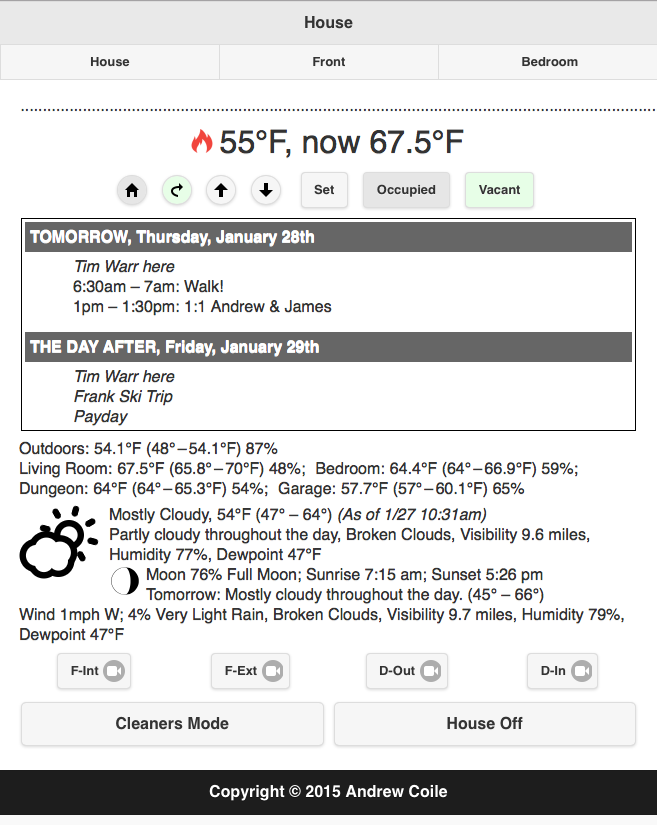
So I have a webpage that gives me status about the house, and lets me control things.
The first page is for the house overall. It has the current heating/cooling mode, the set point temperature, and the actual temperature. There are buttons to put the Nest Thermostat in Home or Away, Raise the set point by one degree, Lower the set point by one degree, or bring up a dialog box to set it to something specific (useful for going from 60°F to 70°F, for instance). There are also Occupied and Vacant buttons for turning the interior motion detectors on and off.
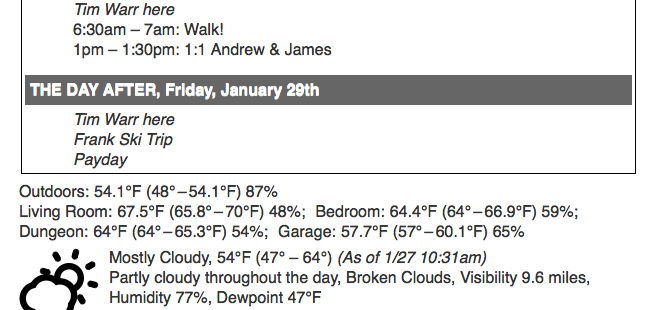
The next thing it displays is my calendar….it shows Today, Tomorrow, and The Day After. It combines information from my multiple personal calendars and from my work calendar.
The next section is the environment inside the house, which it gets from the Netatmo weather station. I bought the base system, which has one interior (which is the hub) and one exterior sensor, and then I added three more interior sensors and the Rain Gauge (which does not display unless there is rain).
The following section is the weather forecast, from DarkSky. They have an incredible API, and the detail you can get is phenomenal. I strip it down to just the current forecast (and icon), the forecast for that day, the Lunar phase, sunrise, and sunset times, and the forecast for tomorrow.
DarkSky will also link to National Weather Service alerts for my area. The one thing that drives me absolutely insane is that the NWS reports are in ALL CAPS. It makes it hard to read, and takes up more screen real-estate. So there’s a scary amount of code devoted to turning the NWS stuff back into reasonable capitalization, which requires capturing and capitalizing place names (because “san jose” would look stupid, when it’s supposed to be “San Jose”).
The final section has buttons for Foscam interior cameras and Foscam exterior cameras, and the DropCam outside camera (on the front of the house) and the DropCam interior camera (in the den). There’s also a button for what I call “Cleaners Mode,” which basically turns on every possible light to give my cleaning crew as much light to work with as possible, and a “House Off” button that turns everything off that it can.
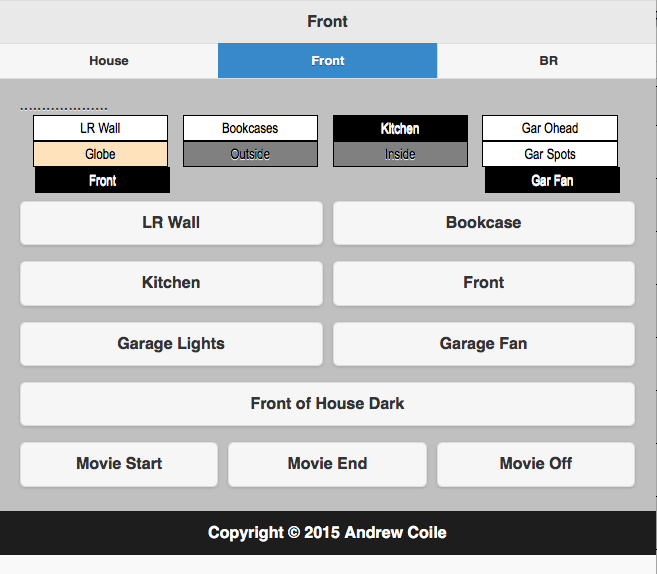
For specific control, there’s a page per area. The Front of house page has indicators at the top for the current state of lights (somewhat approximated for the Hue bulbs). There are also three presets: Movie Start, which turns off all the lights in the living room and kitchen, and turns the inside and outside wall-washers (located on the half-wall between the dining area and the kitchen) and the Globe light in the same area on at a reduced intensity. The Movie End preset turns on the kitchen light, and puts the wall-washers and globe up to full intensity. Movie Off turns off the wall-washers and the globe.
The first draft had the backgrounds of the buttons themselves change to reflect the device state, but that falls apart when you have the presets, and just became annoying, so I switched to the state display at the top, and leave the buttons alone.
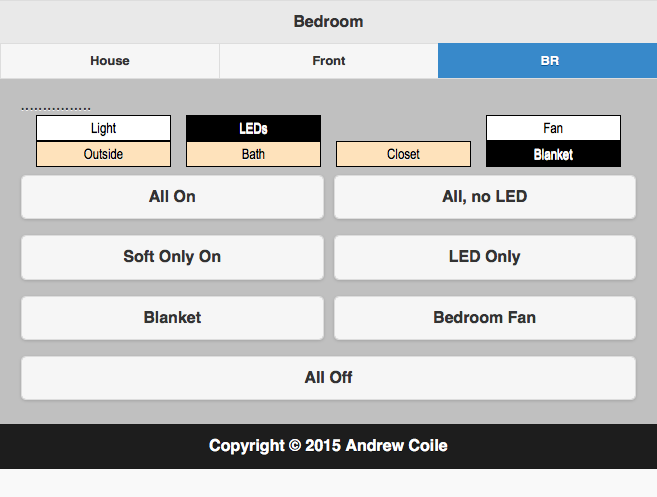
I have three groups of lights in the bedroom: There’s a floor-standing torchiere, which is driven by a WeMo light switch by the door. There are a couple of IKEA LED spotlights, one directed towards the bed for reading and the other acting as a wall washer. And there are three Philips Hue bulbs, one in a lamp on my dresser near the closet, and one on each nightstand, one towards the outside and one by the bathroom.
The presets are All On – torchiere, LEDs, and Hue; All, no LED – torchiere and Hue; Soft Only On – Hue only; and LED Only – torchiere and Hue off, LEDs on.
I also have my electric mattress pad plugged into a WeMo Insight outlet/energy monitor module, and a fan plugged into another one. The electric mattress pad automatically turns off every morning at 7am (by which time I’m supposed to be up), and comes back on in the evening, although the pad won’t actually turn on until I press the power button on its controller. (I used to have an electric blanket, and still refer to it that way, but having the heat come up from underneath is much more efficient…and since the cat insists of clawing the crap out of the blanket, the chances of doing her harm are lessened.) The bedroom fan will automatically turn off at 3am, which is useful for when the evenings are still warm and the A/C has set back, but turning off means I won’t wake up at 5am freezing from the cold breeze. I could actually do it based on bedroom temperature if I wanted, using the bedroom Netatmo sensor through IFTTT to control the Belkin WeMo — which is what I do with the fan in the garage, to dump excess garage heat into the attic during the day.
For debugging purposes, I have the dots across the top add a dot whenever it does a background poll of status. If there were communication errors, they would be reported there as well.
I used JQueryMobile, but I must say I’m not particularly happy with how it came out. I’ll probably eventually redo it using Bootstrap and/or other technologies. AJAX helped by JQuery is what is used to poll all the different devices, and to do the control requests.
Things mentioned:
Netatmo Weather Station
DarkSky (Forecast.io), DarkSky API
Nest Thermostat (now part of Google)
DropCam cameras (now part of Nest)
Foscam cameras
Belkin WeMo Insight Energy-Monitoring Switches, Wall Switches, and Outlets
Philips Hue Bulbs and Bridge
IKEA LED reading spotlight and Floor Lamp
Low-Voltage Electric Heated California King Mattress Pad
Vornado Fan
JQuery, JQuery Mobile